


CSGO Settings Walkthrough
When it comes to settings, the first aspect is to be realistic about your gaming device. Only set up the CS:GO settings according to the basic parameters of your computer. Otherwise, you will get into trouble.
Here’s a list of other aspects you must take a closer look at before going through the game:
CSGO Video Settings
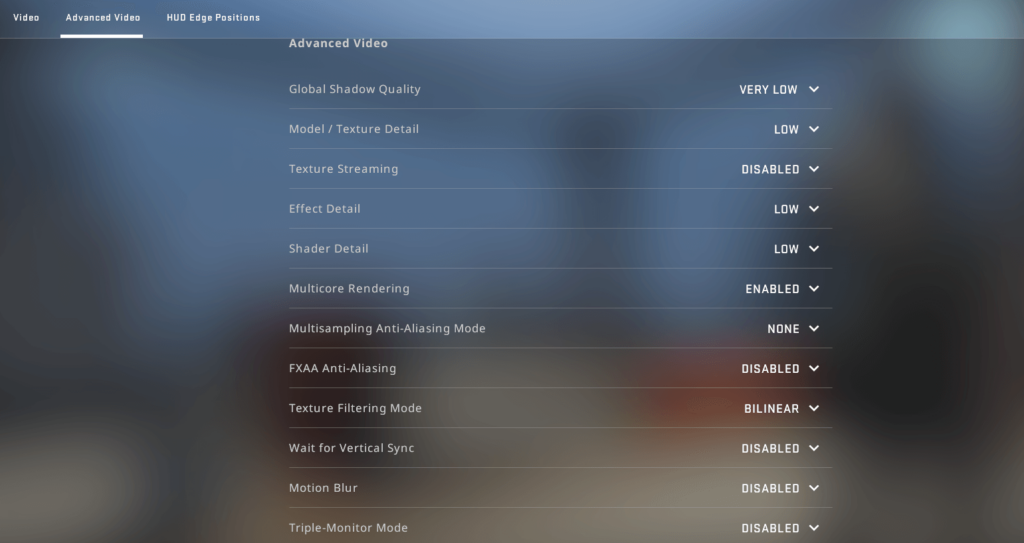
CS:GO is a highly visual game. If you cannot see properly, you absolutely cannot perform properly. As recommended prior, you must look at the specifics of your computer device.
Most pro-players use the 1280×1024 resolution, as opponents tend to look wider while moving past the screen. If your “playing machine” is not that good and you are suffering in terms of performance, you can lower it down as necessary.
Many players can play with a resolution below 720p but it can significantly affect your performance.
Another important piece of advice is to keep a distance from CS:GO FSP boosting programs. The popularity of this type of software has been largely boosted by live streamers and Youtubers, but you must be aware of risks like viruses and fraudulent schemes to steal your data.
Always keep in mind that the only feasible way to have a higher FPS is by modifying your graphics card or CPU. Besides these realistic options, you cannot rely on “alternative” FPS-boosting solutions.
The next topic is the aspect ratio, which is mostly 16:9 or 4:3 for CS:GO players. Currently, most PC monitors feature a 16:9 aspect ratio, which is automatically detected when you install and launch CS:GO.
Pay attention to this aspect and make sure the aspect ratio fits your monitor’s native ratio. When it comes to brightness, just keep it at the maximum level. This way, you will have the ability to spot opponents no matter how dark the map scenario is.
CSGO Audio Settings
Your listening skills have a significant impact on your performance on CS:GO, as well as the way you set up the audio settings. Use the proper settings control to make sure you can properly listen to steps, movements, and gunshots as better as possible.
This section is mostly optional, so you can set it up according to your preferences. For example, if your teammate’s voice is too loud, you can lower it a bit using the voice chat volume.
CSGO Crosshair Settings
The cross-hair is a core aspect of your gameplay. CS:GO default cross-hair is not used by competitive players due to its confusing mechanics. Many pro-level players even experiment with different cross-hair changes to see what fits their needs best.
Once you’ve got a good grip of the basics of CS:GO shooting, the best approach is to change the default cross-hair settings. We recommend a Classic Static style with no centered dot with a 2.5 length, no gaps, medium outline, and T-style on.
Not long ago, Valve Corp. introduced a cross-hair generator feature that users can use to share their cross-hair settings with other players.
CSGO Key Binds
It is not a novelty that efficiently playing CS:GO requires a lot of key binding. A solid mechanical keyboard is fundamental not only to ensure a more comfortable gaming experience but also to higher accuracy and reliability on in-game inputs.
When you talk about CS:GO, one of the game’s advantages is its highly configurable key binding setup.
For example, using the default method to choose between different grenades in the middle of a shooting is not efficient and can get you killed within seconds. Instead, you can simply add a different key bind and it’s solved.
Pro-level players always set up different key bindings according to their preferences or needs, constantly focusing on increased performance and numbers. Another pro-level secret is setting up key binding and combining them with mouse movements.
CSGO Mouse Settings
Mouse sensitivity plays a core role when it comes both to shooting and movement accuracy, which makes these specific settings a controversial topic even among pro-level players.
A part of the pro-level scene prefers lower sensitivity, as it can result in a more consistent aim. Another share of the world’s most gifted CS:GO players prefer higher sensitivity, as it results in a superior ability to turn away from flashes thrown at them.
Please note that all these players practice for years, so their opinion cannot be taken for granted. Instead of opinions, let’s take a look at the numbers.
In terms of percentage, most professional players prefer to have their DPI (the standard used to measure mouse sensitivity) set at a range between 400 and 800. As this is not set in stone by any means, you can set up a lower DPI to start and then increase it to find what works best for you.
Another topic often discussed among standard and aspiring competitive CS:GO players is mouse acceleration. Once it is enabled, the mouse cursor will move further based on how rapidly your hand moves.
This is an especially bad idea for beginners or players who have a hard time developing a consistent aim, as it curbs the development of solid muscle memory.
CSGO Settings Summary
While these two topics may not seem directly correlated, the difference between winning or losing a CS:GO dwells in a simple lag during a massive shootout or the inability to identify an opponent due to low visibility.
If you want to climb up the ranks as a competitive CS:GO player or simply improve your experience as a gamer, proper game optimization will ensure a higher level of performance and smoother gameplay sessions.

