
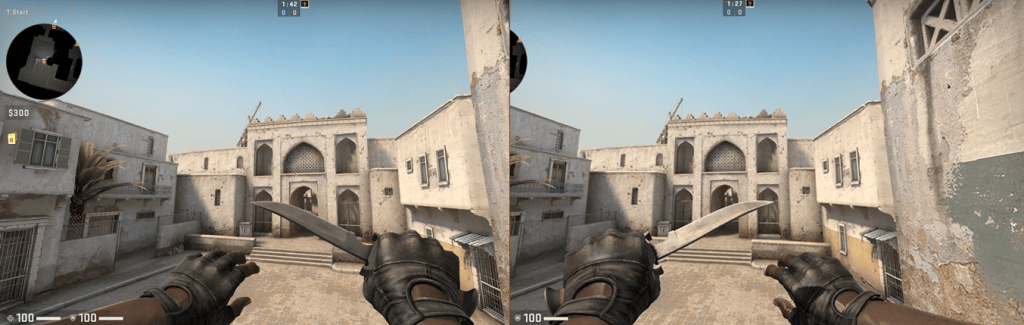


Read on for a full guide on how to switch weapon hands in CS:GO.
The Basics of Hand Switching on CSGO – All You Need to Know
When standard players watch professional CS:GO competitions, they often question why many pro-level players play with the weapon hand switched to the left side. The answer dwells on the player’s dominant eye.
The dominant eye is the one eye you rely more upon than the other or simply have a better vision or ability to fixate on a certain element. Finding which eye is your dominant eye is crucial for activities that require focus on multiple targets, like playing CS:GO.
Pro-level players have evolved their skills so much compared to standard players that they get to the point of exploiting minimal aspects that can be transformed into benefits to help them climb the rankings.
If you did not figure out whether your dominant eye is the right or left one, you can easily find out with several tests available on YouTube. Within minutes, you will discover your dominant eye.
Once you’ve surpassed this mark, you can take time to think about how your orientation skills on CS:GO can fit your eyesight. Whether you want to play competitively or not, this ability will drastically change your performance as a CS:GO player.
With trained eyesight, you will look at the game like a hawk flying over the prairie, being able to read small nuances, identify potential threats with superior speed, and react much quicker than your opponents.
CSGO Weapon Hands Switching – Key Binds & Command Controls
Do you need to switch the gun side on CS:GO? If that’s your desire, you need to learn how to manipulate the commands to switch the hand bind. As long as you do it properly, a simple key bind will allow you to switch hands in a matter of seconds.
With a single keystroke, you will be able to adapt to surprising circumstances and adapt your strategy to win. Not only you can switch hands from one side to the other in a fixed way, but you can also opt for a more dynamic command to switch hands during shootouts.
Thankfully, setting up the commands on CS:GO to switch weapon hands is not rocket science. Let’s take a look at how you can do it:
Opening the Console Command
Without proper key binding, you will not be able to switch weapon hands. After launching CS:GO, you must find the settings icon at the bottom left of the main menu screen.
Once you have found this option, click on it, find the “Game Settings” tab and select it. Scroll down through the list and find the “Enable Developer Console” option. Set this option to “Yes” and click on Apply at the bottom of the page before closing the tab.
If you’ve made this far successfully, you must go to the “Game Settings” tab once again and head over to the “Keyboard and Mouse” section. At the bottom of this section, you will find the “Toggle Console” option.
After giving it a click, bind it to the key you feel most comfortable with. Hence, every time you need to open the console command, you will just need to simple keystroke. Remember not to clash this option with other key bindings.
Switching Weapons from One Hand to Another
The default weapon hand on CS:GO is better suited for righties. If you decide to switch your weapon hand from one side to the other, you just need one command.
The console command that controls how you switch hands on CS:GO is “cl_righthand.” To swap your weapon from your right hand, you must set up a toggle bind that will bind a key to this specific control.
For example, let’s say you choose the “U” key. After opening the console command, you can create a toggle bind by entering “bind u toggle cl_righthand 0 1.” Once this bind is activated, the U key will switch the side at which your weapon is displayed.
To fix it as a permanent command, you just need to use your “Autoexec” file to save the code. If you do not want to make it permanent, you just need to use the key bind every time you want to switch hands.
Dynamic Strafing
A fluid strafing allows you to keep the camera focused on a specific target while you can move sideways. The classic keys used for strafing are the “A” key to move to the left side and the “D” key to move to the right side.
It is possible to switch a weapon between hands while you are strafing from one side to the other. While many players do not know about this possibility, all you need to do is bind the strafing keys to include a command for dynamic strafing.
After opening the console command, enter the code “bind a “+moveleft ; cl_righthand 1”;bind d “+moveright ; cl_righthand 0” and click on “Apply.” Once this command is activated, the weapon will be moved to the right when you strafe left and vice-versa.
Switch Weapon Hands in CSGO Summary
Although this function is often ignored by many CS:GO players, switching hands while playing CS:GO has a tremendous effect on your shooting ability and general view model.
Whether you want to toggle between both hands to handle your weapon or only switch hands when strictly necessary, use this short guide wisely and you can successfully achieve several outcomes.

